
Ever Accounting adds three built-in user roles, Accounting Manager, Accountant, and Accounting Auditor, so you can give a bookkeeper, accountant, or auditor exactly the access they need, without making them a full site administrator or sharing your own login.
Available Ever Accounting Roles
| Role | Access Level | Description |
|---|---|---|
| Accounting Manager | Full access | Has permissions similar to an Administrator within Ever Accounting. |
| Accountant | Limited access | Has access to a limited set of Ever Accounting features. |
| Accounting Auditor | Read-only | Can only view records, cannot create, edit, or delete anything. |
“Similar to an Administrator” applies to Ever Accounting’s own screens and data only. Assigning Accounting Manager doesn’t grant broader WordPress abilities like installing plugins or managing other users.
How to Assign an Ever Accounting Role to a New User
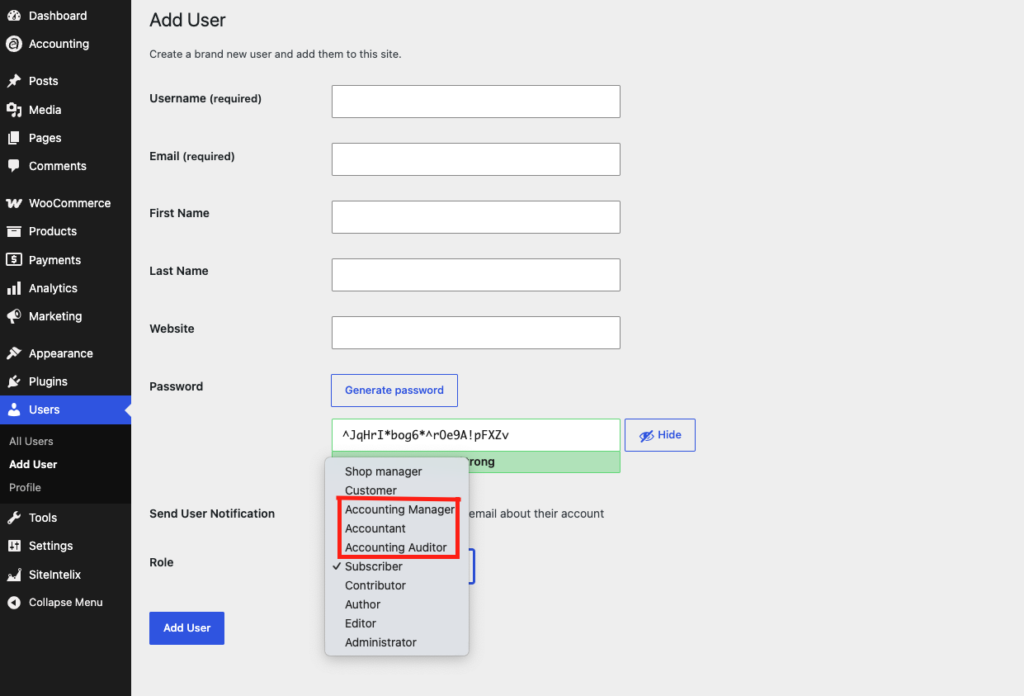
- Go to Add New User: From your WordPress Dashboard, navigate to Users > Add New User. (You’ll need Administrator access on your site to do this.)
- Enter the User’s Details: Fill in the new user’s Username, Email, and the other required fields as usual.
- Select an Ever Accounting Role: In the Role dropdown, choose Accounting Manager, Accountant, or Accounting Auditor.
- Create the User: Click Add New User.
That’s it, once the account is created, the user will only see the Ever Accounting menus and actions their role permits when they log in.
Changing an Existing User’s Role
🔎 Needs your check: this describes standard WordPress role behavior. Please confirm it works the same way for Ever Accounting’s roles before publishing.
You don’t need to create a new account to change someone’s access, you can update an existing user’s role at any time:
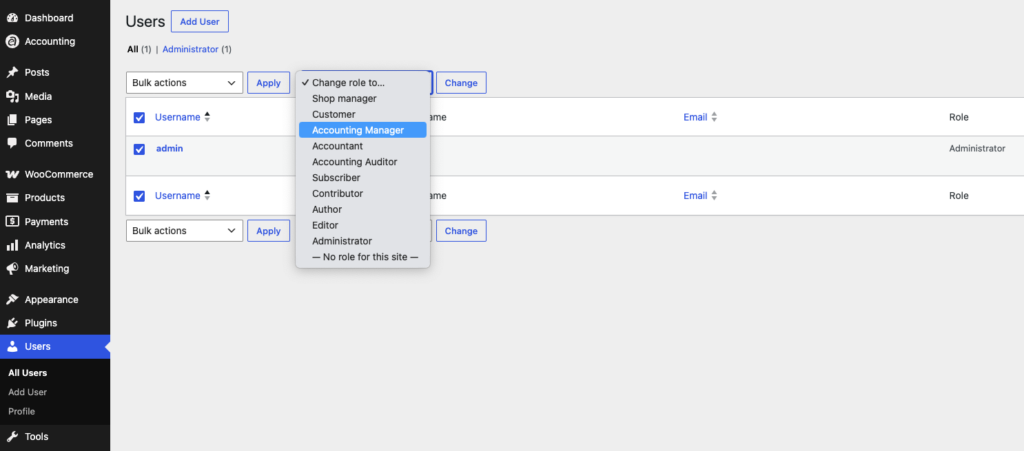
- Open All Users: Go to Users > All Users.
- Select the User: Click their name to open their profile, or check the box next to their name.
- Choose the New Role: In the Role dropdown (or the Change role to… dropdown above the list, for bulk changes), select Accounting Manager, Accountant, or Accounting Auditor.
- Save the Change: Click Update User (or Change, if you used the bulk option).